
The sites that show up in AI answers are almost never the flashiest ones. That observation comes from a GEO-ready web design audit published by Vareweb in 2026, based on direct analysis of which pages earn citations versus which pages look good. They are the ones with a clean content hierarchy, a clear H1, logical H2s, and answers that sit near the top of the page instead of three scrolls down past a hero slider.
Google's own guidance published in May 2026 is explicit: "To maximize your site's visibility in generative AI search features, ensure your content is crawlable, as Google Search generative AI models use publicly accessible, crawlable content to learn patterns and provide relevant, grounded responses." (Source: Google Search Central, AI Optimization Guide)
The gap between visual hierarchy designed for human engagement and structural hierarchy that enables AI citation is where most B2B technology companies are quietly losing visibility.
What Visual Hierarchy Does to AI Crawlers
A well-designed B2B homepage typically prioritizes impression over information. The hero section features a large background image or video, a value proposition headline in large type, and a secondary subheadline, all visually compelling to a human landing on the page. The actual specific information a buyer needs - what the product does, who it's for, what problem it solves - appears below the fold after two or three scroll depths.
AI crawlers do not scroll. They fetch the initial HTML the server returns and parse what is there. Most major AI crawlers, GPTBot, OAI-SearchBot, ClaudeBot, and PerplexityBot, do not execute JavaScript, according to analysis of 500 million-plus GPTBot fetches by Vercel and MERJ's AI crawler research, cited in the GEO guide published by ToTheWeb in June 2026. (Source: totheweb.com) A page that renders its core content through JavaScript, common in React and Next.js sites, is largely blank to these crawlers even if it looks fully rendered to a human visitor.
The implication is uncomfortable for modern B2B website design: the visual hierarchy that earns a human's first impression may be actively hiding the content that would earn an AI citation.
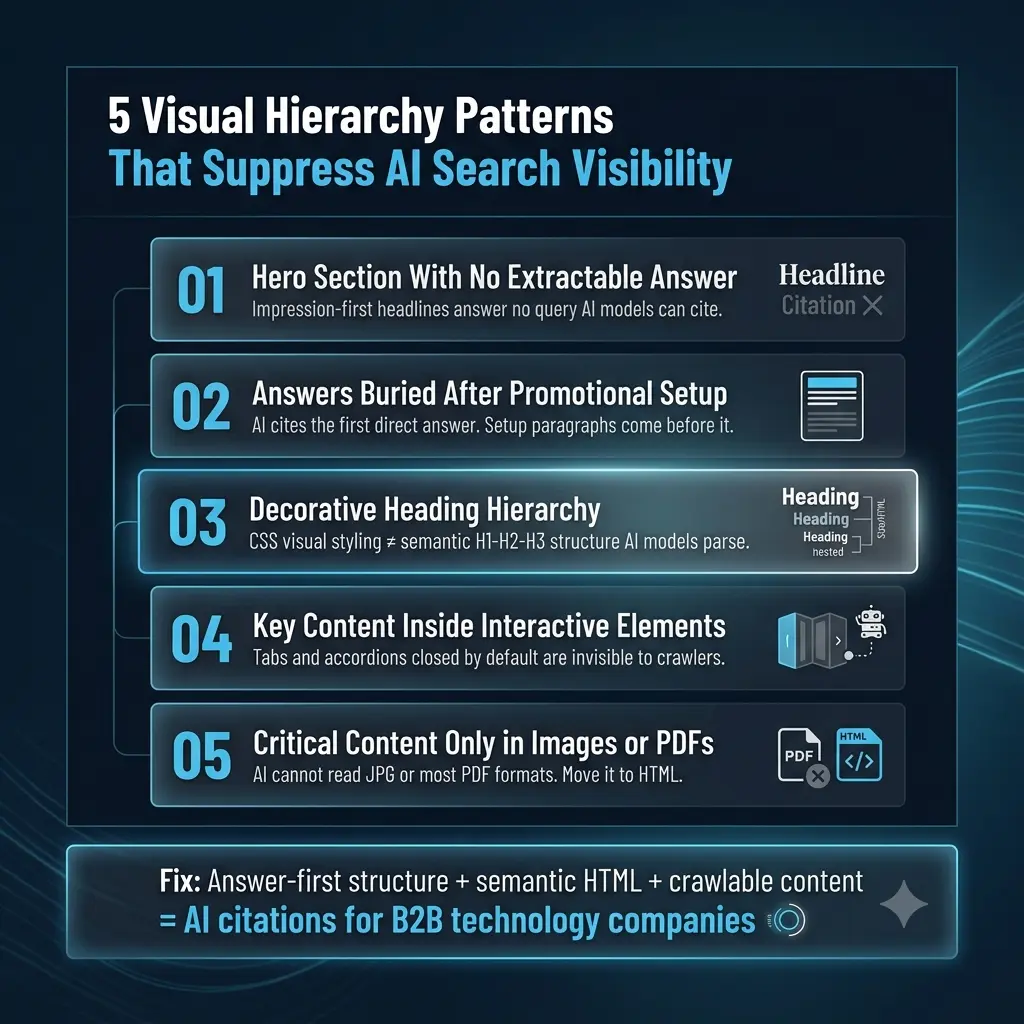
The Five Visual Hierarchy Patterns That Suppress AI Visibility
Pattern 1: The hero section that contains no extractable answer.
Most B2B hero sections are designed to create a feeling, not to answer a question. "Accelerate your revenue. Simplify your workflow. Transform your business." These phrases are designed to be visually impactful and emotionally resonant. They answer no question a buyer has typed into ChatGPT. An AI model reading the page sees a headline that says nothing specific and moves on.
The fix is not to remove the hero or sacrifice visual quality. It is to ensure the hero headline contains a specific, extractable claim about what the product does, who it serves, and what outcome it delivers. "Enterprise contract management for US manufacturing companies, reduces review cycles from 3 weeks to 4 days" is a hero headline that is also the exact content an AI model extracts when a manufacturing buyer asks "what is the fastest contract management platform for manufacturers."
Pattern 2: Answers buried after promotional setup.
The standard B2B content pattern is: state the problem in general terms, establish empathy and context, introduce the product category, describe your approach, then provide the specific answer. This structure was designed for human readers who need to be warmed up to a conclusion.
AI models are not warmed up. They fetch the page, find the first specific, direct answer to the query they are resolving, and cite it. The answer buried three paragraphs into a setup context is not the answer that gets cited; the competitor's answer, which appears in their first sentence, does. Valtech's 2026 AI accessibility guide makes the same argument from a different angle: "build for the broadest possible range of visitors, human and machine, sighted and not, and you build a site that performs across all channels." (Source: valtech.com) Answer-first structure serves screen readers, AI crawlers, and busy humans equally.
Pattern 3: Heading hierarchy that is decorative rather than structural.
The heading structure visible to a human, large bold type at varying sizes, with different font weights and colors for visual rhythm, may have no semantic relationship to the actual H1, H2, H3 hierarchy in the HTML. A designer who applies visual hierarchy through CSS classes without corresponding semantic heading elements produces a page that reads beautifully and parses chaotically.
AI models rely on heading hierarchy to understand page structure. They use it to identify what each section answers, to find the main topic of the page, and to locate the most relevant passage for a given query. A page where H2 elements are used for visual styling rather than semantic organization gives AI models contradictory signals. The GEO checklist from LLMrefs identifies "use clear heading hierarchies (H1, H2, H3) with one topic per section" as one of the highest-priority technical requirements for AI citation. (Source: llmrefs.com)
Pattern 4: Key content inside interactive elements AI cannot parse.
Tabs, accordions, carousels, and expandable sections are common B2B web design patterns. They improve the human browsing experience by reducing visual clutter and allowing users to navigate to what they care about. They create an AI visibility problem because the content inside these elements may not be in the initial HTML response; it may only appear after a JavaScript interaction.
The content that earns AI citations is the content that is present in the HTML the crawler fetches, not the content that becomes visible after a user clicks. If your integration list lives inside a tab that defaults to closed, your integration capabilities are invisible to AI crawlers. If your pricing is inside an accordion, your pricing page earns no AI citations for pricing queries.
Pattern 5: Content that answers questions living only in images or PDFs.
Data visualizations, comparison tables, and case study one-pagers embedded as images or PDFs contain some of the most citation-worthy content on B2B websites. Statistics, benchmarks, integration lists, compliance certifications. AI models cannot read image files or most PDF formats reliably. This content is invisible to crawlers regardless of how prominently it displays to humans.
Every piece of content that should earn an AI citation must have a plain text equivalent in crawlable HTML. The GEO guide from ToTheWeb is direct: "Move anything you want found into clean HTML."
What AI-Visible Visual Hierarchy Actually Looks Like
The pages with the strongest AI citation performance share a specific structural profile: one H1 that states the core topic directly, H2 headings introducing one distinct subtopic each, text that opens with the direct answer before expanding with context, and FAQ sections with explicit question-answer format. No critical content dependencies on JavaScript rendering or interactive element expansion.
This is not a conflict between good design and AI visibility. ICTS Digital Transformation's 2026 GEO-readiness analysis concludes: "The good news: most of these requirements align with what makes a great user experience anyway." (Source: icts.digital) The conflict is between strong design and visually prioritized design that sacrifices semantic structure.
Frequently Asked Questions
Why does visual hierarchy affect AI search visibility for B2B websites?
AI crawlers parse the HTML a server returns, not the rendered visual experience a human sees. Visual hierarchy applied through CSS, animations, JavaScript, and interactive elements may make a page more engaging to humans while making the page's core content less accessible to AI models. Content that appears above the fold visually but is loaded after a JavaScript execution is often invisible to crawlers like GPTBot, OAI-SearchBot, and ClaudeBot that do not execute JavaScript.
What heading structure should a B2B technology website use for AI search visibility?
One H1 per page that states the core topic or answer directly. H2 headings that each introduce a distinct subtopic with one answerable question per section. H3 headings for supporting details within sections. The heading hierarchy should be semantic, meaning the headings in the HTML match the visual structure the human sees, not decorative, where visual size and weight are applied through CSS classes that do not correspond to semantic heading elements.
Does server-side rendering matter for AI search visibility?
Yes, significantly. Content loaded client-side through JavaScript, common in React, Next.js, and other single-page application frameworks, is often not visible to AI crawlers that do not execute JavaScript. Google's Googlebot can process JavaScript content as long as it is not blocked, but most other AI crawlers cannot. B2B websites built on modern JavaScript frameworks should audit which content is server-side rendered versus client-side rendered, and ensure that all content intended for AI citation is present in the initial HTML response.
How do interactive elements like tabs and accordions affect AI citation?
Content inside tabs, accordions, or expandable sections that are closed by default is typically not present in the initial HTML response and therefore not visible to AI crawlers. If key content, integration lists, pricing details, feature specifications, comparison data, lives exclusively inside these elements, it earns no AI citations regardless of how prominent it is in the human user experience. The fix is to ensure all citation-worthy content has a plain HTML equivalent that is present in the initial server response.
What is the fastest audit a B2B marketing team can run to identify visual hierarchy problems affecting AI search?
Use Chrome DevTools or a browser extension to disable JavaScript, then navigate your most important pages. What content is visible without JavaScript? That is the content AI crawlers see. Compare it to the content you would want an AI model to cite for your highest-priority buyer queries. The gap between those two things is your immediate audit list. Google Search Console's URL Inspection tool shows how Googlebot renders your pages, which identifies JavaScript rendering issues for the Google ecosystem specifically.
References
Valtech, How to Make Your Site Readable for AI Agents, accessibility and GEO alignment
Vareweb, Is Your Website Built for AI Search? GEO-Ready Web Design Checklist


